


Last updated November 2026. We checked the Roblox facts in this post on November 6, 2026.
I am an animator. I started with 2D motion in After Effects, and then I taught myself Blender. Later, I made 3D videos for my YouTube channel, and I hit the same wall in every project: character animation. So when people ask "can AI make Roblox animations?", I do not give a quick yes.
Here is my honest answer. Yes, AI can make Roblox animations today. But "AI" means three different things here, and not all of them make the motion. The others are useful too. They just do a different job.
The short answer
- Roblox's own AI helps you build your game. Since November 5, 2026, it can also make an animation from a text prompt, in beta.
- ChatGPT and Claude in a chat write great scripts. When they write the motion, they guess every angle, and the final result is not that good yet.
- A motion model makes the motion. It learned from real people who move, and that is the kind of AI we use at NoCapMocap.
These are the animations from our home page. Each one started from one text prompt, and then we polished it in our free Animator.
Three kinds of AI, three different jobs
We build NoCapMocap, so we are not neutral. Keep that in mind as you read. We tell you where each tool is good, ours too.
| The AI | What it does for your animation | Use it for |
|---|---|---|
| Roblox Studio AI | Writes scripts and builds objects. Prompt to Animation (beta) makes an R15 animation from a text prompt. Animation Capture (beta) turns a short video into an animation. | Your scripts, your objects, quick animations, and moves that you can film |
| ChatGPT or Claude in a chat | Writes scripts. Guesses the angles if you ask for motion. | Scripts that play, loop and stop an animation |
| A motion model, such as NoCapMocap | Makes a full R15 animation from a text prompt or a phone video | New moves that you cannot film or animate fast |
Can Roblox's own AI make animations?
Yes. Since November 5, 2026, Roblox Studio can make an animation from a text prompt, in beta. Here is what Roblox's tools do today. We checked each one on November 6, 2026.
Assistant writes code
Assistant is the AI helper in Roblox Studio. Its guide lists questions, scripts, objects, Creator Store assets, materials, meshes and procedural models. Assistant can write a script that plays an animation that you already have. It can also write keyframes in a script, but then it guesses the angles, as ChatGPT does.
Prompt to Animation makes an animation from a text prompt
On November 5, 2026, Roblox released Prompt to Animation as a Studio beta. You turn it on in File > Beta Features, open Assistant and type /generate_animation. It makes an R15 animation from your prompt, and each action can run for up to 10 seconds. Roblox says that it is not charging for it at this time. Roblox also released Motion Rebuilder, which turns R6 clips into R15. Roblox's launch post has the details.
I tried it the day it came out, and honestly, it is good. You type a move and it comes back super fast, right there in Studio. One tip from my tests: if you want a walk for your game, write the word "loop" in your prompt. It makes a big difference.
Do you want to see how it did next to our tool? Read NoCapMocap vs Roblox Prompt to Animation. Or follow the steps for a walk in each tool. More ways to make animations is good news for every Roblox creator.
Animation Capture turns a short video into an animation
Animation Capture is a beta tool in Studio. You give it a video of one person, in one shot that is shorter than 15 seconds. It makes keyframes on an R15 rig. If you can film the move, it is a good place to start. Roblox's Animation Capture guide lists the video rules. This video from RoBuilder shows how it works in Studio:
Our Video-to-Motion (beta) also starts from a phone video. It can follow up to 8 people in one clip. Our video checklist shows how to film a clip that works well.
Can ChatGPT or Claude make Roblox animations?
On their own, only in a rough way. With our app, they can make real motion. First, look at what a Roblox animation is.
An animation is a list of poses over time. Each pose sets the angle of each body part, such as the elbow or the knee. Roblox then blends from one pose to the next.
A chat AI has to write all those angles from memory. It cannot see the character, and it does not know how a body keeps its balance. So it guesses. The result often looks like a character who just learned that it has elbows. Arms twist the wrong way, rotations flip, and the feet slide.
Even the maker of one AI keyframe plugin calls the results drafts that a person must polish. You can fix a draft by hand in the Animation Editor. But at that point, you are the animator again.
Where a chat AI is great: the script
A chat AI is very good at the code around an animation. Ask it to load an animation, set its priority, loop it or stop it. This is the kind of script to ask for. Put it in a Script inside an R15 rig in Workspace.
-- A Script (not a LocalScript) in an R15 rig.
local humanoid = script.Parent:WaitForChild("Humanoid")

-- Use the rig's Animator, or add one if the rig has none.
local animator = humanoid:FindFirstChildOfClass("Animator")
if not animator then
	animator = Instance.new("Animator")
	animator.Parent = humanoid
end

-- Put your Animation ID here.
local animation = Instance.new("Animation")
animation.AnimationId = "rbxassetid://ANIMATION_ID"

-- To loop it, turn on looping before you publish the animation.
local track = animator:LoadAnimation(animation)
track.Priority = Enum.AnimationPriority.Action
track:Play()
So on its own, a chat AI is great for the script. For the motion, give it a motion model.
Make real motion inside ChatGPT
We built a NoCapMocap app for ChatGPT. Tell ChatGPT the move that you want. Our app tells ChatGPT to give you the credit cost first. The app spends only within the credit limit that you approve when you connect it. If you want ChatGPT to wait for your OK, say so. Then you watch each version in a 3D preview and compare them side by side.
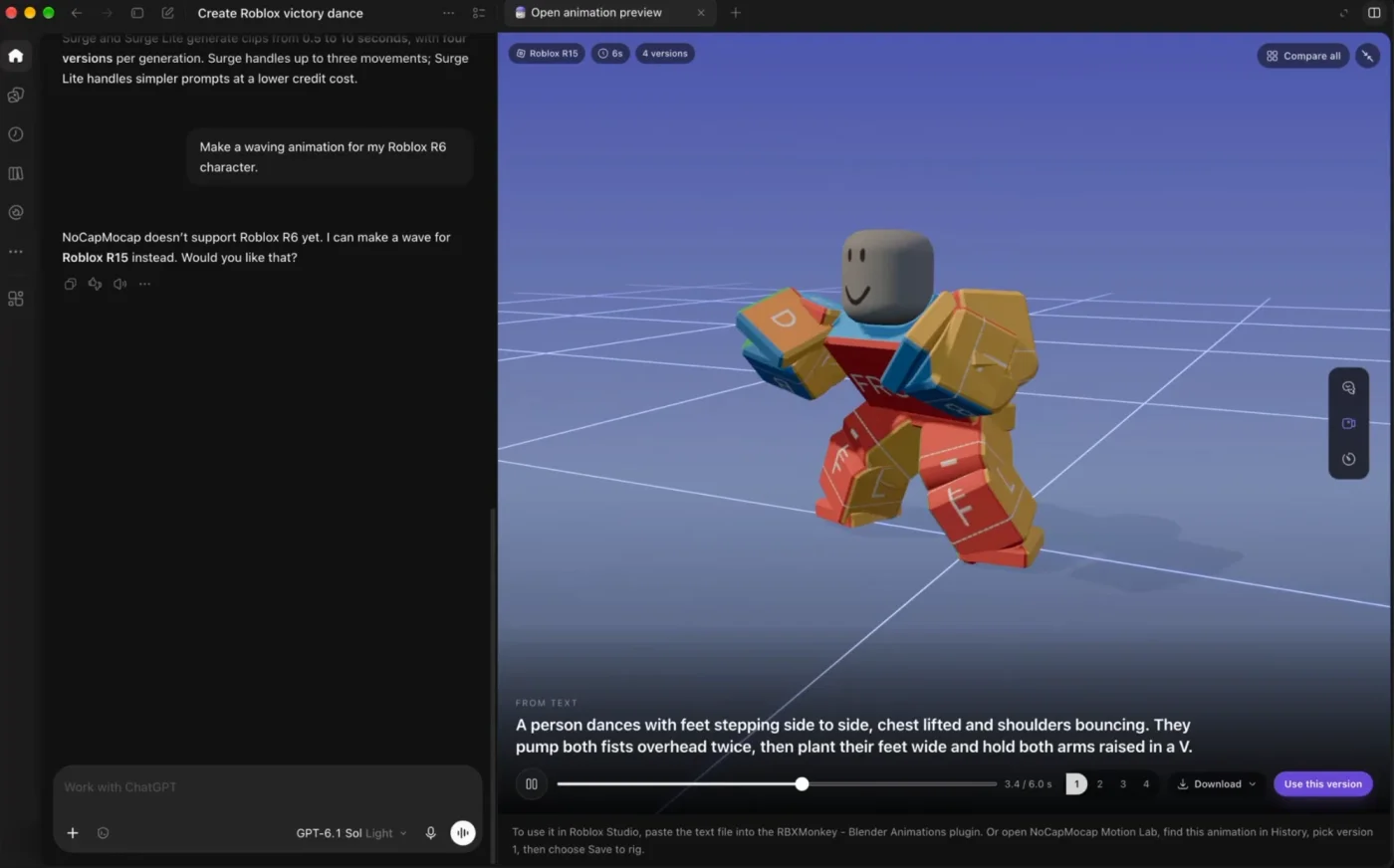
It is honest, too. In the chat above, we asked for an R6 wave. It said that NoCapMocap does not support R6 for now, and it offered an R15 wave.
Claude works the same way, with the same 3D preview. When ChatGPT lists our app, you can add it from inside ChatGPT. Until then, connect it with our address, as step 1 below shows.
Can an AI agent make Roblox animations?
This is the part that changed the most this year. An AI agent is an AI app that can use tools for you, such as ChatGPT, Claude, Codex or Cursor. It connects to a tool through an MCP. An MCP is a plug that lets an AI app use a tool outside the chat.
Two MCPs matter for Roblox animation:
- Roblox Studio's MCP connects your AI app to your open place in Studio. It can edit scripts, run Luau and insert assets, such as an animation that you already have. Roblox says that it can also call the generate_animation tool, which makes an animation from a prompt. If an agent writes keyframes with Luau through it, the agent guesses the angles, as a chat AI does.
- Our animation MCP makes the motion. Your agent asks for a move, and a motion model makes it.
You can connect both to the same agent. Here is how it works with ours.
- Connect your app. In ChatGPT, Claude or Codex, add
https://www.nocapmocap.com/mcp/animationsand connect with one click. You sign in to NoCapMocap and approve how many credits the app can spend and when the connection ends. For Cursor and other apps, make a connection in Settings under Agent connections. - Ask for the move. For example: "Make a 4-second victory dance for my Roblox character." Our MCP tells the agent to give you the cost first. If you want it to wait for your OK, say so.
- Choose a version. Surge gives you 4 versions of the move. ChatGPT and Claude show them in a 3D preview, so you can compare them and download the one you like.
- Put it in Studio. The animation is also in your NoCapMocap History. In our free Motion Lab plugin, open the History tab, choose your rig and click Preview on rig. Then click Save to rig.
This is step 4 in Motion Lab:
If you also connect Roblox Studio's MCP, the agent can do step 4 for you through Motion Lab. When you ask, it can also publish the animation to your Roblox account. When you publish, Roblox gives the animation a number, called an Animation ID. Your game uses that number to play it.
Your credits stay safe
The agent never spends more than the limit that you approve. It cannot cancel or delete your animations. Never paste a password or a connection token into the chat.
No AI agent? You can do all of this on the website or in Motion Lab. Our Roblox animation guide shows each button.
What AI still gets wrong
AI saves you hours, but it does not replace your eye. Check these things on every AI animation before you use it in your game:
- Feet. Feet can float or slide a little. Play the animation on a rig and watch the feet first.
- Faces and fingers. Our animations move the 15 body parts of an R15 character. They do not animate faces or fingers.
- R6. We do not support R6 characters for now. Motion Lab works only with R15 characters.
- Style. The AI gives you a good move. It does not know the style of your game. If a move needs more swagger, a faster loop or a bigger finish, change it in our free Animator in your browser.
So which AI should you use?
Use each AI for the job that it does well:
- ChatGPT or Claude in a chat: scripts, not motion.
- Roblox Studio AI: scripts, objects and the world of your game. Use Prompt to Animation for a quick animation, and Animation Capture when you can film a short clip of the move.
- A motion model: new moves from a text prompt or a phone video, with versions to choose from.
Our short version is this: use Roblox's tools to build your game, and use NoCapMocap to make it move.
I built NoCapMocap for my own videos first. I did not want the same Mixamo clips that people see in every other video. Then I learned that many Roblox creators had the same problem.
FAQ
Can Roblox's AI Assistant make animations?
Yes, since November 5, 2026. Prompt to Animation is a beta tool in Roblox Assistant. It makes an R15 animation from a text prompt, and Roblox says that it is not charging for it at this time. Assistant can also write the script that plays an animation that you already have.
Can ChatGPT make Roblox animations?
On its own, ChatGPT guesses the angle of each body part, so the result is a rough first try. It is very good at the script around an animation: load it, play it and stop it. With our NoCapMocap app, ChatGPT can make real motion. Our app tells ChatGPT to give you the credit cost first, and you compare the versions in a 3D preview.
Can Claude make Roblox animations?
In a chat, Claude guesses the angles, as ChatGPT does. With our animation MCP, Claude can make real motion. Our app tells Claude to give you the cost first. Claude then makes the animation with your credits and shows you a 3D preview. If you also connect Roblox Studio's own MCP, Claude can put the animation on your rig through our free Motion Lab plugin.
Can the Roblox Studio MCP make animations?
Yes. Roblox says that the Studio MCP can call the generate_animation tool with a rig and a length of up to 10 seconds. An AI app can also use the Studio MCP to edit scripts and insert an animation that you already have. For motion from NoCapMocap, connect our animation MCP too.
How much does an AI animation cost?
Roblox says that it is not charging for Prompt to Animation at this time. On NoCapMocap, Surge costs 1 credit for each second, so a 4-second move costs 4 credits. Surge Lite costs half, rounded up. One text prompt gives you 4 versions for that price.
A new account starts with 0 credits, and the smallest pack is $7 for 25 credits. Surge and Surge Lite are not available in some countries, and the pricing page tells you where. Your AI app can have its own costs.
Do AI animations work on R6 characters?
Our animations do not work on R6 for now. When you choose Roblox, your animation fits an R15 character. Motion Lab also works only with R15 characters. If your game uses R6, use a tool or an animator that makes R6 animations.
References
- Roblox Creator Hub, Assistant guide (checked November 2, 2026)
- Roblox DevForum, Studio Beta: Generate R15 Animations From a Prompt (November 5, 2026)
- Roblox DevForum, Studio Beta: Prompt-to-Avatar (October 29, 2026)
- Roblox Creator Hub, Animation capture (checked November 2, 2026)
- Roblox Creator Hub, Roblox Studio MCP server (checked November 2, 2026)
- Roblox DevForum, Lazy Animator plugin (August 3, 2026)
- Roblox Engine API, Animator


